


GooTool
| » Screenshots » Downloads | » Comments |
Latest version: 1.0.3.441
Release date: 10/15/2010 - 10:56
GooTool is a utility to extend your World of Goo experience, enabling you to install new levels and mods to provide further gameplay, and to view and share your World of Goo accomplishments.
Features
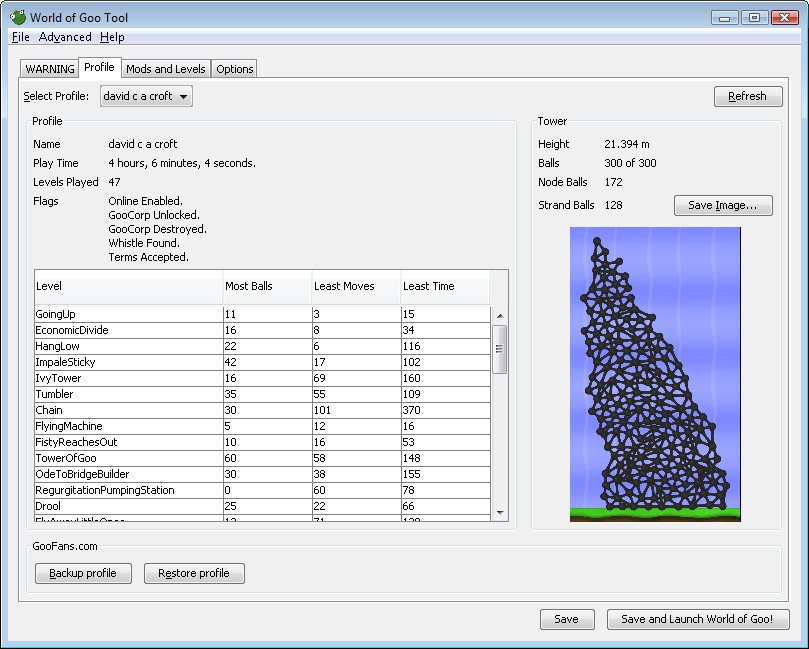
- Profiles - View your profiles, view your tower image and stats, backup and restore your profile, move it between machines, and upload to your tower on this website.
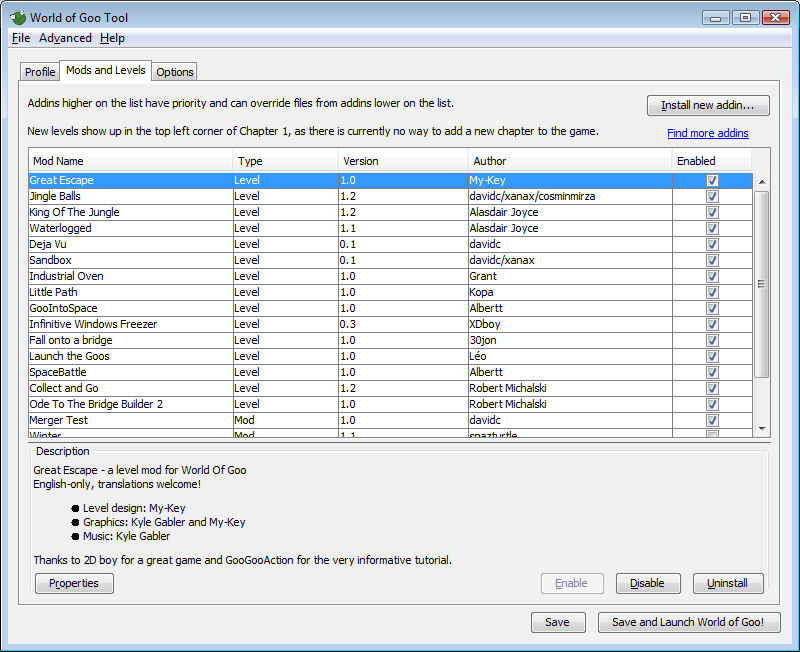
- Addins - Install and uninstall mods and new levels within the game.
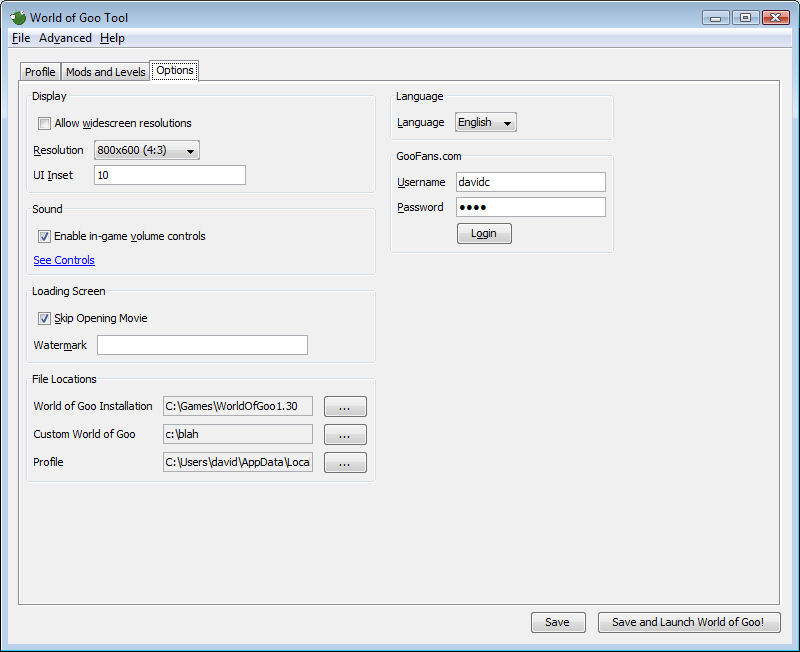
- Options - Configure certain aspects of the game that you can't easily do otherwise - for example changing resolution or removing the loading screen video.
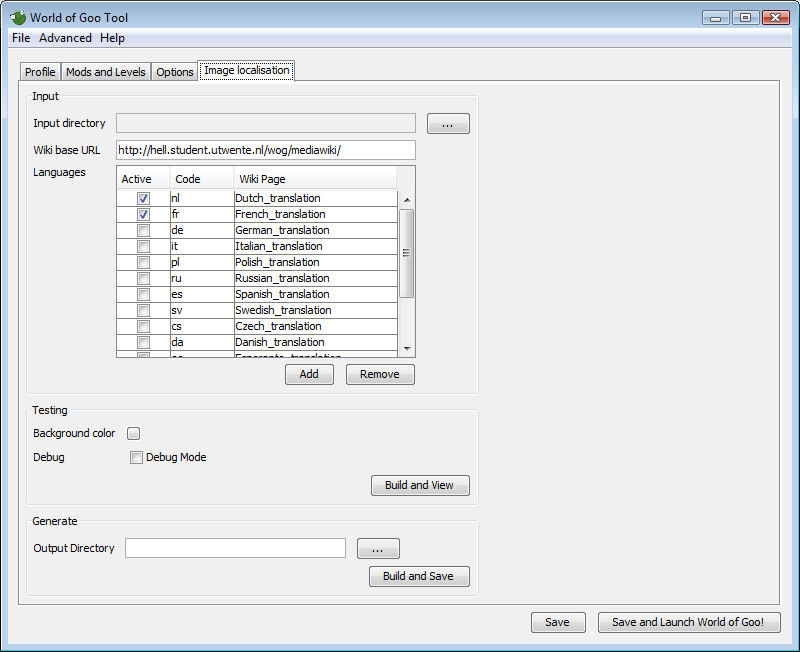
- Translation - An advanced mode for those interested in translating the game into their own language.
Windows Installation
Simply run the installer and choose a suitable location. You can uninstall it from your Control Panel.
You need Java version 1.6.0 or greater to run this program. The installer should download it for you if you don't have it already, otherwise get it from java.com.
Note for Windows 8 Users:
You'll need to install the latest version of Java before installing GooTool, otherwise the installation will fail. For more information, see here.
Linux Installation
You need Java 1.5.0 or greater. 1.6.0 is highly recommended. Try java -version from the command line. See here for more info on installing/upgrading Java.
Extract to a directory such as /usr/local/gootool or /home/yourname/gootool, then run bin/gootool.
Debian users can simply install the .deb package provided.
Mac Installation
Simply drag GooTool somewhere (e.g. your Applications folder) and run it. To uninstall, drag it to your Trash.
Changelog
1.0.3, 15-October-2010
- This is the first release with the full source code released simultaneously (#0000244).
- Available addins are now stored in your home directory and not your custom directory. They will be moved automatically upon upgrade to this version (#0000263).
- Consume World of Goo's stdout, possible fix for long hangs on "Save and Launch" (#0000261).
- Added new command-line utility "gooinfo" to dump information about user's profile and tower under Windows and Linux. Run it on its own for syntax (#0000249).
- Added "gooinfo -validateaddin" to do preliminary addin sanity check (currently just validates the manifest) (#0000250).
- .bin files are now strictly prohibited in the override directory.
- Fixed installation of addins with XML special characters (quotation marks etc) in level name/subtitle (#0000266).
- If a background task fails due to a fatal error (e.g. out of memory), don't assume the task has succeeded (#0000268).
- Fix profile tower rendering under Mac OS X (#0000265).
- Fix location of Steam install. Automatically locate World of Goo 32-bit install on 64-bit Windows.
- Don't throw an exception in addin update check if no addins are installed (#0000271).
- Abort the build if the target custom directory is the same as the source directory (#0000272).
- Refuse to install goomods with upper-case characters in their file extension, to avoid cross-platform incompatibility (#0000275).
- Correctly load the level history from a user's profile, handles levels with names like 4444 (#0000269).
- Addins with unsatisfied dependencies now show red in the addins tab (#0000178).
- Decode broken UTF-8 in World of Goo profile names prior to version 1.40 (#0000270).
- Fix skipeolsequence/cutscene not being respected for levels using addin manifest version 1.1 (#0000252).
- Fix dependency max-version not being shown correctly on the addin properties dialog.
1.0.2, 18-November-2009
- Fixed NullPointerExceptions on startup introduced in 1.0.1 when profile is missing or empty (#0000245).
- Fix detection of non-Sun JREs under Linux (#0000242).
- Updated the installer to auto-install a more recent JRE if needed (#0000243).
- Refresh profiles tab when profile file is changed. Disable publish button if no selected profile.
1.0.1, 08-November-2009
- Added an option to the Advanced menu to generate an online ID (for users who are unable to connect in-game) (#0000235).
- Allow generated online IDs to be removed as and when 2D Boy servers come back online.
- Display skipped levels in the profile tab.
- Don't display tower data if the profile has no tower.
- Don't allow publish if the profile has no online id (#0000236).
- Goomod version 1.1 is now available: (#0000188)
- Addins can now specify a thumbnail image.
- Add strings easily using text.xml in goomod.
- An addin can now provide more than one level, so level is now a child of levels.
- level/cutscene and level/skipeolsequence added.
- level/ocd is now officially optional.
- GooTool now lets you select new languages (for which you need to download translations and possibly fonts from http://hell.student.utwente.nl/wog/wiki/):
zh, cs, da, eo, fi, ka, he, hu, ja, no, pl, pt, pt_BR, sv, tp, uk, vi (#0000239). - Fixed an issue preventing you ever saving again if you uninstall an addin and quit before saving (#0000240).
- Remember GooTool's window position/size between runs (#0000234).
1.0.0, 22-October-2009
- You can now rate addins from the Addins tab within GooTool (#0000175).
- Added a "Check for Updates" button so you can automatically update your addins (#0000179).
- Allow GooTool to find and work with the 1.41 (bin32/bin64) version of World of Goo under Linux (#0000218).
- Allow GooTool to find and work with the Big Fish version of World of Goo under Mac OS X (#0000225).
- Added a diagnostic report to the Help menu to aid debugging GooTool problems (#0000232).
- Use RealIrrKlang.dll if it exists in the source directory, in case user manually installed Maks' volume control (#0000219).
- Allow changing refresh rate from the Options tab (#0000182).
- Skip Thumbs.db, .DS_Store and .svn when installing addins (#0000215).
- Provide scrollbars for long addin descriptions in the addins tab and properties dialog (#0000226).
- Run lengthy operations in a background thread so the GUI doesn't lock up (#0000174).
- Rename PC/Linux to Windows/Linux (#0000221).
- Make AddinInstaller use AddinReader, allowing installation of an addin from an extracted directory.
- Initial work on iPhone version.
- Goomod format 1.1: Authors can now specify a thumbnail image for addins.
0.10.5, 28-June-2009
- 0000164: [billboards] First-time build fails due to missing billboards.goomod (davidc) - resolved.
- 0000165: [profile] Allow sorting of columns in profile tab (davidc) - resolved.
0.10.4, 22-June-2009
- "Publish profile" button added, publishes your tower to GooFans.com
- Auto download updates to the billboard contest mod (unless you opt out)
- Movie and animation decoding/encoding added, also available from the advanced menu (format not finalised)
- Possible fix for "See Controls" link not working for some
- Don't copy Thumbs.db files, fixes Access Denied exceptions for some Windows users
- GooTool will now store your preferences in a file if you specify -preferences <filename> on the commamnd line
0.10.3, 18-Apr-2009
- Windows users can now enable Maks Verver's volume control via a checkbox
- Added "find more addins" link to the addins tab
- Added a Debian .deb build, added X Windows menu entry
- Added all the missing screen resolutions to options tab (mostly widescreen)
- Warn on startup if using demo version of World of Goo
- Friendlier version numbers in some places
- Use 127.0.0.1 instead of resolving "localhost": prevents it resolving to "::1" on IPv4-only systems giving "Address family not supported by protocol family: bind"
- Mime type is now application/x-world-of-goo-addin
- Removed the initial "WARNING" tab as it seems stable enough now 
0.10.2, 09-Feb-2009
- Added GooFans.com login, added profile backup/restore
- Auto-detect the Linux installation location through ~/.WorldOfGoo/LastRun.txt
- Adjust layout of Chapter 1 and automatically resize screen to fit installed levels.
- Send OS and CPU type in CheckVersion API call
- Fix reading of Unicode characters in profiles under World of Goo 1.40+
- The checkboxes in addin list can now be clicked to enable/disable the addin
- Linux startup script now uses /bin/bash due to some strange sh-alikes out there.
0.10.1, 15-Jan-2009
- Fixed a huge WTF on image encoding on non-Mac platforms.
0.10.0, 15-Jan-2009
- Added Mac support!
- Added file association and document icon for goomods on Mac
- Created a Windows installer, added goomod file association and icon
- rewrote code to support java 1.5 (you can no longer drag addins to reorder them though)
- fixed size of about dialog
- added file handling for Windows/refocussing if GooTool clicked on again
- skip over Unicode byte-order-marks, fixes UTF-8 files saved from Notepad etc
- Added options to the Advanced menu to encode/decode the various game file formats. You can select whole directories or multiple files.
- Preliminary support for the World of Goo Linux beta added. If you want to force GooTool to use your WINE World of Goo, run "GOOTOOL_PLATFORM=windows bin/gootool"
- Moved Addin description to the main Addins tab.
0.9.7, 19-Dec-2008
- fixed addin transform files to be UTF-8, fixes translated texts with non-ASCII characters
- Added OCD flags for custom levels
0.9.6, 19-Dec-2008
- You can now save the image of your tower (transparent, full-size, or thumbnail)
- addin.xml assumed to be in UTF-8, fixes non-latin characters in addins
- Allow user to install an addin that already exists, prompting to downgrade/replace/upgrade it
- When installing a level addin, notify them again that the level appears on chapter 1.
- Memory usage in About dialog is now updated each time you open the window
- Some dialog memory leaks plugged
- More descriptive errors when saving with an invalid addin enabled
- Remember the most recently used addin installation folder
- Automatically enable an addin after installing it
- Renamed all remaining uses of "wog" abbreviation
- Layout improvements in profile and addins panels
0.9.5, 21-Nov-2008
- added Linux build, also look in .wine and .PlayOnLinux for exe/profile
- allow selection of multiple addins to install
- better error description when l10n source image can't be loaded
- added new version notification on startup and via help menu
- added new version ignore option
- added menu items for various help webpages
- some initial internationalisation of GooTool itself
- fixed NPE on save when no resolution selected, various fixes to make sure 800x600 always appears as default
- added java JRE/JVM information to About dialog
- clarify that GooTool doesn't modify existing WoG installation
0.9.4, 17-Nov-2008
- make sure 800x600 resolution is always available
- fixed charset on wiki downloads (e.g. Cyrillic)
- added layers and gaussian blur effects to image localisation tool
- added arched text to l10n tool
- added fit-to-box (bounding box) positioning to l10n tool
- added justification to l10n tool
- added debug boundary drawing to imagegenerator and checkbox to GUI
- added alpha channel to color spec in l10n tool
- major refactor of XML format in l10n tool
- GUI l10n usage shows a progress dialog
- building images to output directory added
0.9.3, 15-Nov-2008
- added image localisation tool for translators
- Addin level OCD requirement is now optional
- possible fix for pyris NPE (unselected resolution)
0.9.2, 13-Nov-2008
- Fixed bug saving when unrecognised language is selected
- Added the missing languages to the options pane
0.9.1, 13-Nov-2008
- Profile parsing fixed for certain test cases
- Added more debugging for NPE on "save" bug
- Improved logging, removed redundant logging
- Don't try to build addins that have "vanished" (deleted from addins dir)
- ESC works to close dialogs
- Try and create the custom directory if the user hasn't already created it
- Less cramped GUI
- Display available tower balls on profile
0.9.0, 10-Nov-2008
- Enabling addins. You can now enable addins and build your World of Goo!
- You can now install level-type addins. They are now fully merged and appear as new levels at the top left of Chapter 1.
- Better file/directory support. GooTool will now remember where it last found WorldOfGoo.exe, and it lets you manually locate your profile if it can't find it.
- You can now choose the custom directory where GooTool will build your World. This enables Vista users with UAC restrictions to still build.
- Progress bar added for long operations such as initial load and file merging.
- Skip Opening Movie now works
- Loading screen watermark now works.
- Addins can be reordered properly.
- Taller towers are no longer cropped in the profile pane.
0.8.0, 05-Nov-2008
- Initial release
- Loading current preferences (language, resolution, ui_inset).
- Saving preferences (to config.txt.new - does not overwrite config.txt yet)
- Loading profiles.
- Displaying profile data.
- Displaying level achievements.
- Displaying tower data.
- Generating various images of the tower.
- Installing mod-type addins to the addin directory (but you can't enable them yet).
- Validating the addins.
- Uninstalling mod-type addins from the addin directory.
- Viewing addin properties.
- Reordering addin priority.
- Save and Launch.
- Automatic detection of JRE.
- Decrypting and encrypting .bin files.
- Decrypting and parsing profile data.
- Transformation/merging of XML files.
There are 6 screenshots.

| Version | Platform | Release Date | Filename | Size |
|---|---|---|---|---|
| 1.0.3.441 | Windows | Fri, 10/15/2010 - 10:56 | GooTool-1.0.3.441-WindowsSetup.exe | 1.79 MB |
| 1.0.3.441 | Mac OS X | Fri, 10/15/2010 - 10:56 | GooTool-1.0.3.441-MacOSX.zip | 1.84 MB |
| 1.0.3.441 | Linux | Fri, 10/15/2010 - 10:56 | gootool-1.0.3.441-linux.tar.bz2 | 1.69 MB |
| 1.0.3.441 | Debian (.deb) | Fri, 10/15/2010 - 10:56 | gootool_1.0.3.441-1_all.deb | 1.69 MB |
| 1.0.3.441 | Source | Fri, 10/15/2010 - 10:55 | gootool-1.0.3.441-source.tar.bz2 | 3.28 MB |
| 1.0.3.408-dev | Source | Sat, 06/19/2010 - 23:04 | gootool-1.0.3.408-dev-source.tar.bz2 | 3.21 MB |
| 1.0.2.376 | Windows | Wed, 11/18/2009 - 12:01 | GooTool-1.0.2.376-WindowsSetup.exe | 1.77 MB |
| 1.0.2.376 | Mac OS X | Wed, 11/18/2009 - 12:01 | GooTool-1.0.2.376-MacOSX.zip | 1.83 MB |
| 1.0.2.376 | Linux | Wed, 11/18/2009 - 12:01 | gootool-1.0.2.376-linux.tar.bz2 | 1.68 MB |
| 1.0.2.376 | Debian (.deb) | Wed, 11/18/2009 - 12:01 | gootool_1.0.2.376-1_all.deb | 1.68 MB |
| 1.0.1.366 | Windows | Sun, 11/08/2009 - 06:23 | GooTool-1.0.1.366-WindowsSetup.exe | 1.77 MB |
| 1.0.1.366 | Mac OS X | Sun, 11/08/2009 - 06:23 | GooTool-1.0.1.366-MacOSX.zip | 1.83 MB |
| 1.0.1.366 | Linux | Sun, 11/08/2009 - 06:23 | gootool-1.0.1.366-linux.tar.bz2 | 1.68 MB |
| 1.0.1.366 | Debian (.deb) | Sun, 11/08/2009 - 06:23 | gootool_1.0.1.366-1_all.deb | 1.68 MB |
| 1.0.0.343 | Windows | Thu, 10/22/2009 - 11:22 | GooTool-1.0.0.343-WindowsSetup.exe | 1.77 MB |
| 1.0.0.343 | Mac OS X | Thu, 10/22/2009 - 11:22 | GooTool-1.0.0.343-MacOSX.zip | 1.82 MB |
| 1.0.0.343 | Linux | Thu, 10/22/2009 - 11:22 | gootool-1.0.0.343-linux.tar.bz2 | 1.67 MB |
| 1.0.0.343 | Debian (.deb) | Thu, 10/22/2009 - 11:22 | gootool_1.0.0.343-1_all.deb | 1.67 MB |
| 0.10.5.297 | Windows | Sun, 06/28/2009 - 05:19 | GooTool-0.10.5.297-WindowsSetup.exe | 1.59 MB |
| 0.10.5.297 | Mac OS X | Sun, 06/28/2009 - 05:19 | GooTool-0.10.5.297-MacOSX.zip | 1.65 MB |
| 0.10.5.297 | Linux | Sun, 06/28/2009 - 05:19 | gootool-0.10.5.297-linux.tar.bz2 | 1.51 MB |
| 0.10.5.297 | Debian (.deb) | Sun, 06/28/2009 - 05:19 | gootool_0.10.5.297-1_all.deb | 1.5 MB |
| 0.10.4.290 | Windows | Mon, 06/22/2009 - 11:37 | GooTool-0.10.4.290-WindowsSetup.exe | 1.59 MB |
| 0.10.4.290 | Mac OS X | Mon, 06/22/2009 - 11:37 | GooTool-0.10.4.290-MacOSX.zip | 1.65 MB |
| 0.10.4.290 | Linux | Mon, 06/22/2009 - 11:37 | gootool-0.10.4.290-linux.tar.bz2 | 1.51 MB |
| 0.10.4.290 | Debian (.deb) | Mon, 06/22/2009 - 11:37 | gootool_0.10.4.290-1_all.deb | 1.5 MB |
| 0.10.3.254 | Windows | Sat, 04/18/2009 - 08:37 | GooTool-0.10.3.254-WindowsSetup.exe | 1.57 MB |
| 0.10.3.254 | Mac OS X | Sat, 04/18/2009 - 08:37 | GooTool-0.10.3.254-MacOSX.zip | 1.62 MB |
| 0.10.3.254 | Linux | Sat, 04/18/2009 - 08:37 | gootool-0.10.3.254-linux.tar.bz2 | 1.48 MB |
| 0.10.3.254 | Debian (.deb) | Sat, 04/18/2009 - 08:37 | gootool_0.10.3.254-1_all.deb | 1.47 MB |
| 0.10.2.222 | Windows | Mon, 02/09/2009 - 12:44 | GooTool-0.10.2.222-WindowsSetup.exe | 1.56 MB |
| 0.10.2.222 | Mac OS X | Mon, 02/09/2009 - 12:44 | GooTool-0.10.2.222-MacOSX.zip | 1.62 MB |
| 0.10.2.222 | Linux | Mon, 02/09/2009 - 12:44 | gootool-0.10.2.222-linux.tar.bz2 | 1.48 MB |
| 0.10.1.197 | Windows | Thu, 01/15/2009 - 15:11 | GooTool-0.10.1.197-WindowsSetup.exe | 1.53 MB |
| 0.10.1.197 | Mac OS X | Thu, 01/15/2009 - 15:11 | GooTool-0.10.1.197-MacOSX.zip | 1.59 MB |
| 0.10.1.197 | Linux | Thu, 01/15/2009 - 15:11 | gootool-0.10.1.197-linux.tar.bz2 | 1.45 MB |
| 0.10.0.192 | Windows | Thu, 01/15/2009 - 13:41 | GooTool-0.10.0.192-WindowsSetup.exe | 1.53 MB |
| 0.10.0.192 | Mac OS X | Thu, 01/15/2009 - 13:41 | GooTool-0.10.0.192-MacOSX.zip | 1.59 MB |
| 0.10.0.192 | Linux | Thu, 01/15/2009 - 13:41 | gootool-0.10.0.192-linux.tar.bz2 | 1.45 MB |
| 0.9.7.152 | Windows | Fri, 12/19/2008 - 12:13 | GooTool-0.9.7.152-Windows.zip | 1.26 MB |
| 0.9.7.152 | Linux | Fri, 12/19/2008 - 12:13 | gootool-0.9.7.152-linux.tar.bz2 | 1.24 MB |
| 0.9.6.147 | Windows | Fri, 12/19/2008 - 04:50 | GooTool-0.9.6.147-Windows.zip | 1.26 MB |
| 0.9.6.147 | Linux | Fri, 12/19/2008 - 04:50 | gootool-0.9.6.147-linux.tar.bz2 | 1.24 MB |
| 0.9.5.126 | Windows | Fri, 11/21/2008 - 13:16 | GooTool-0.9.5.126-Windows.zip | 1.26 MB |
| 0.9.5.126 | Linux | Fri, 11/21/2008 - 13:16 | gootool-0.9.5.126-linux.tar.bz2 | 1.24 MB |
| 0.9.4.90 | Windows | Mon, 11/17/2008 - 13:08 | GooTool-0.9.4.90-Windows.zip | 1.23 MB |
| 0.9.3.80 | Windows | Fri, 11/14/2008 - 23:05 | GooTool-0.9.3.80-Windows.zip | 1.22 MB |
| 0.9.2.69 | Windows | Thu, 11/13/2008 - 07:54 | GooTool-0.9.2.69-Windows.zip | 1.21 MB |
| 0.9.1.64 | Windows | Thu, 11/13/2008 - 02:22 | GooTool-0.9.1.64-Windows.zip | 1.21 MB |
| 0.9.0.44 | Windows | Sun, 11/09/2008 - 15:54 | GooTool-0.9.0.44-Windows.zip | 1.21 MB |
| 0.8.0 | Windows | Wed, 11/05/2008 - 18:07 | gootool_0.8.0.zip | 1.18 MB |
There are 5 current downloads. Show 46 archived downloads.
This software, including all programs, computer files, and associated documentation, are Copyright (c) 2008, 2009, 2010 David C A Croft. All rights reserved.
DISCLAIMER
This software is provided 'as-is', without any express or implied warranty. In no event will the authors be held liable for any damages arising from the use of this software.
GOOTOOL LICENSE
Permission is granted to anyone to use this software for any purpose, including commercial applications, and to alter it and redistribute it freely, subject to the following restrictions:
1. The origin of this software must not be misrepresented; you must not claim that you wrote the original software. If you use this software in a product, an acknowledgment in the product documentation would be appreciated but is not required.
2. Altered versions must be plainly marked as such, and must not be misrepresented as being the original software.
3. This notice may not be removed or altered from any distribution.
4. You may not use the name "GooTool" in any modified version. For the avoidance of doubt, only original files downloaded from http://goofans.com/ may keep the name "GooTool".
ACKNOWLEDGEMENTS
Under Windows, this program uses launch4j. Copyright (c) 2004, 2008 Grzegorz Kowal. See LICENSE.launch4j.txt for the license.
This program uses user interface classes Copyright 2000-2005 JetBrains s.r.o. See LICENSE.jetbrains.txt for the license.
This program uses cryptographic functions from the BouncyCastle library. Copyright (c) 2000 - 2008 The Legion Of The Bouncy Castle (http://www.bouncycastle.org). See LICENSE.bouncycastle.txt for the license.
This program uses JSch. Copyright (c) 2002,2003,2004,2005,2006,2007,2008,2009 Atsuhiko Yamanaka, JCraft,Inc. See LICENSE.jsch.txt for the license.
- Login to post comments
Sat, 10/24/2009 - 21:19
i have two problems it says it cant render my tower and when i try to publish my profile it says trying to get property of a non-object at gooprofile.upload.inc:221
Sat, 10/24/2009 - 22:22
i cant even use the website uploader because it says i havent enabled online play please help!!!!!
Sun, 11/08/2009 - 11:47
HELP
GooTool is really buggy on Windows 7. Maybe you should try to make a separate version specifically for Windows 7 because compatibility mode itself won't work!
Trying would be easy if you had a virtual PC: http://dlc.sun.com/virtualbox/vboxdownload.html
You need the Windows 7 ISO but you can download that either as a torrent or sending me files to evaluate because I installed it a week after it came out.
Sun, 11/08/2009 - 11:51
ottomobille: Get a copy of GooTool 1.0.1 and use the new option on the Advanced menu: "Online Player ID->Create". This problem is caused by 2D Boy's World of Goo Corporation servers being down, so the game doesn't automatically generate an ID.
Enchanter49: I will put this on the TODO list.
Wed, 11/11/2009 - 12:13
Hi
I've tried to create an ID with GooTool 1.0.1 (Linux version), and since then, the soft doesn't start anymore with this error:
"Uncaught exception (java.util.NoSuchElementException): null"
I've tried to reinstall the software, but it doesn't resolve the problem.
Fortunately World of Goo still works normally.
If someone has an idea to fix this.... Thanks in advance!
SirFratus
Wed, 11/11/2009 - 13:10
SirFratus: please check out http://goofans.com/gootool/troubleshooting/crash and create a new forum topic with the relevant part of your logfile.
Fri, 11/13/2009 - 21:02
Can you transfore your previous gootool files to the new goo tool?
The goo must be flamed.
Sat, 11/14/2009 - 03:11
Of course. Just download and double click and gootool will be updated.
My Gooish profile | Videos on YouTube | My WOG Mods
Sun, 11/15/2009 - 04:44
Since I've upgraded to ubuntu 9.10, the soft starts again. I've no explanation, sorry for the inconvenience.
SirFratus
Sat, 11/21/2009 - 18:12
It's enjoyable and helpful, but I still have some problems and Errors.
I'm so happy! ¬_¬ <-- OM NOM NOM
..............╔╝
..............╚╗
...............╨
Wed, 12/23/2009 - 14:52
hi
Fri, 12/25/2009 - 22:10
Okay, I'm an idiot. Just found it!
Excellent!
Thu, 12/31/2009 - 13:46
Okay I found the problem for Windows 7 and how to fix it.
This is for reference for all Windows 7 users having trouble starting gootool!
Right-click on the gootool icon shortcut and select properties. When it pops up, go to the compatibility tab and check the box labeled 'Run as Administrator' and press okay. It should now work perfectly. Except it might show a 'blank' loading window, but it still works fine.
In other words, run it with administrator priveleges.
Sun, 01/17/2010 - 11:39
I got World of Goo on Steam, will GooTool and other stuff on this website still work with it?
Sun, 01/17/2010 - 11:44
Yes, of course!
My Gooish profile | Videos on YouTube | My WOG Mods
Sun, 01/17/2010 - 11:54
found the answer in FAQ after I asked as well lol.
thanks!
Sat, 02/27/2010 - 00:20
cooooll
Tue, 03/16/2010 - 08:19
а есть на русском?
пыщь пыщь ололо, говорю по-русски
Tue, 03/16/2010 - 09:38
Да, и есть русский
My Gooish profile | Videos on YouTube | My WOG Mods
Wed, 03/17/2010 - 18:31
Does it have Japanese support? No one has answered me yet...
Wed, 03/17/2010 - 18:45
No it doesn't have Japanese support
My Gooish profile | Videos on YouTube | My WOG Mods
Fri, 04/02/2010 - 11:38
modes where we will put?
Fri, 04/02/2010 - 11:53
Please speak more clearly, I do not know what you are saying. (please try again! )
)
InfernoFans | Chest full of porkchops
Sat, 04/03/2010 - 05:39
http://i970.photobucket.com/albums/ae187/murtimuz/adsz-2.jpg
????????????????
Mon, 04/05/2010 - 09:07
Eh, that does look like a problem. Could you post a higher-resolution image so that we can see what the error is, or could you just write out what it says?
IRC | Chapter Tutorial | Reference Guide
Tue, 04/06/2010 - 10:37
http://i970.photobucket.com/albums/ae187/murtimuz/Balksz1.jpg
?
Tue, 04/06/2010 - 13:01
Okay, that's better. I just couldn't read the text before, it was too small.
Rrgh. I had this problem once, I think, and I totally forgot how I solved it...
Hmm, the only two possible problems I can think of are:
a) Are you running the demo version of World of Goo, or the full version? Where did you get this version from? (Steam, a store, etc)
b) Does GooTool know where your WOG installation is? (i.e, when you click on the "Options" tab, does GooTool display something in the "World of Goo Installation" and the "Custom World Of Goo Installation" text boxes, or are either of these blank?)
Other than this, I dunno. Anyone else have any thoughts?
IRC | Chapter Tutorial | Reference Guide
Sat, 04/17/2010 - 08:09
One not very nice thing in goomod format:
In adding level names and other texts (using addin.xml and text.xml files) is a problem with non-english letters. Why they don't works, when with Encrypt function and in merge folder's files everything's OK?
Author of Platforms of Goo and 64 levels for World of Goo .
Sun, 04/18/2010 - 07:36
GooTool/goomod handles non-ASCII characters fine, BUT you need to make sure you're editing text.xml/addin.xml with a Unicode-aware text editor. If using Windows, I believe Notepad fails but Wordpad works (might be the other way around though).
Sat, 04/24/2010 - 01:47
And UTF-8 coding works correctly.
And I have one thing about Goo Tool and mods adding.
At the goofans.com are about 140 new levels (in more than 100 addins. But in Chapter 1 is place only for 30. If there will be next version of Goo Tool, it should can add new level buttons in the other chapters
Author of Platforms of Goo and 64 levels for World of Goo .
Sun, 04/25/2010 - 02:37
can gootool works in demo?
Spongebob rulez too


Back
Sun, 04/25/2010 - 02:53
No, you need the fully-patched retail version.
my gooey profile | my video channel | author of Hazardous Environment
Thu, 05/20/2010 - 18:29
So I want to be able to control the volume, so I got the gootool. I have the full version of the game, but when I start up gootool is says I have the demo version and need to upgrade to use the tool. I have gone through all of my files and have 'uninstalled' the demo. Then when I tried to use the gootool...another problem occurred. I tried to enable the sound control by clicking 'enable in-game sound control' and then hit 'save' but it wouldn't save. An error message popped up saying that it could not re-write the file. Is there something I can do about that?
Thu, 05/20/2010 - 18:36
eehsiuqs, please see this page to locate your logfile, then create a new topic with this info in the bug report forum.
Fri, 05/21/2010 - 20:55
I fixed all of the problems. Took about an hour of fiddling with my computer, but got all of the controls to work and all of the bugs taken care of. Thanks though.
Sat, 05/22/2010 - 06:33
I install it. I had the game World of Goo with a profile. well, I install gootool and it can't find the profile on the world of goo game.
He creats a new install past for what??
I already uninstall both programs and the really profile seems to be ALWAYS in my pc. I really want to share my towers but with this .... it's impossible!
Sat, 05/22/2010 - 09:22
If you are having problems with GooTool you should create a new forum topic.
It hard for me to understand you, you are having problems with uploading your peofile to goofans?
You can try the direct upload link here: http://goofans.com/leaderboard/upload
My Gooish profile | Videos on YouTube | My WOG Mods
Sun, 05/23/2010 - 15:26
There is a problem when I change the game's resolution, the continue flush tingy at the end of levels is misplaced!
Check out my SoundCloud, MomoSoundWaves
Sun, 05/23/2010 - 15:28
That probably means that you don't have your game patched to v1.3.
my gooey profile | my video channel | author of Hazardous Environment
Wed, 05/26/2010 - 07:15
I do.
Check out my SoundCloud, MomoSoundWaves
Wed, 05/26/2010 - 07:26
Mh, is it just moved a little, or seriously out of place (e.g. really ugly or even unclickable)? Small changes are normal when the resolution is changed. Especially normal <=> widescreen.
my gooey profile | my video channel | author of Hazardous Environment
Wed, 05/26/2010 - 09:33
Oops sorry! the problem only occurred before I used the patch.
Check out my SoundCloud, MomoSoundWaves
Thu, 07/15/2010 - 13:19
the goo tool doesn't allow me to publish my profile. and I can't upload it, also.
Fri, 08/06/2010 - 19:32
what is the source for and why is the source a version (that we can't really use?)
I'm playing Minecraft. My username is theMineMaster2. If you want to see my Cartoony mods updated, then be a Mac user and find a image editing program that isn't confusing for me
Sat, 08/07/2010 - 02:00
It's open source, the program code for GooTool, if you know programing then you can change end add features to GooTool
My Gooish profile | Videos on YouTube | My WOG Mods
Sun, 08/08/2010 - 17:38
How do I compile the source code into an installer file so that I can test the program?
Tue, 08/24/2010 - 07:13
I was trying to update gootool, but these same levels come up! I called because...THEY GOT CLONED! http://img835.imageshack.us/f/whath.png/
InfernoFans | Chest full of porkchops
Tue, 08/24/2010 - 16:19
javerikr: You need JDK, ANT, and ideally (but optionally) IDEA. Run the ANT build file with the 'dist-win32' target and the installer will end up in the 'dist' directory.
James: This happens if the mod author puts a different version number in the goomod file than in they specify on the site. They actually have to manually change it on the upload form (it defaults correctly) so it's pretty hard to do... file a report on the individual addin pages!
Sat, 09/04/2010 - 22:07
This is weird . I downloaded GooTool and it works great! The add-ins and levels work. I have finished the game but when I go to the profiles tab I only have 3 levels there... Going Up, Economic Divide and Hanglow. The saved profile is in the 2DBoy folder. It says for going up 10 most balls which was my old record but I currently had 11 balls. Also when I build my tower in WOGC it also doesn't show. HELP!
Sat, 09/04/2010 - 22:17
Did you have the trial version of World of goo before you got full version? That usually causes the problem.
InfernoFans | Chest full of porkchops